
removing the battery in a SIPROTEC 5 relay can delete or corrupt non-volatile data, depending on what the device was storing in its memory at the time and how the firmware handles power loss. In most cases, the relay keeps configuration and event data in non-volatile memory (NVM) or flash, and the device should preserve those when powered down. However, a battery removal can still cause the following issues:
- Recent events/alarms log entries that were not yet written to non-volatile storage may be lost or corrupted.
- Temporary data in RAM (e.g., transient values, last states) will be lost, and some internal watchdog/logs may not be completed if power is removed abruptly.
- If the relay was in the middle of a write operation (e.g., writing to flash or logging to flash), this can lead to flash corruption or a corrupted configuration or log file sector.
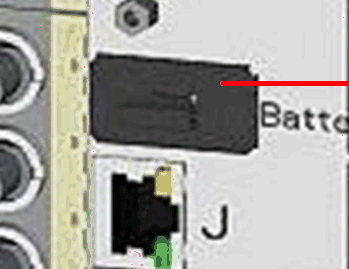
The battery lies in an externally accessible battery compartment. The battery compartment is located on the rear of the base module. You need not open the device when replacing the battery.
If the auxiliary voltage fails, the battery ensures continued operation of the internal clock and storage of certain data (statistical values, values of thermal models) for at least 6 months. Parameterization, logs, and fault records are always stored in a fail-safe way in a non-volatile memory.
The device cyclically checks the charge of the battery. The Battery fault indication is issued if the actual voltage falls below the minimum.
What data is typically stored and at risk:
- Configuration data: usually stored in NVM/flash; should survive power loss.
- Event and fault logs: many SIPROTEC devices store a rolling event log in non-volatile memory; recent entries may be lost if not yet written to flash when power is removed.
- Trip/relay operation history: often stored in NVM; may have gaps if power loss occurred during write.
- Firmware and calibration data: stored in flash/NVM; normally preserved, but a power glitch during a write could corrupt the sector and require recovery or reloading.
- Settings for communication, time synchronization, and channel configurations: stored in flash/NVM; should remain intact unless a write operation is interrupted.
Best practice to minimize risk:
- Do not remove the battery while the relay is operating or during critical write operations.
- If you must replace the battery, ensure the device is in a safe state (ideally power-stable, non-writing period) and follow the manufacturer procedure.
- After battery replacement, perform a diagnostics check and verify that configuration, event logs, and essential data are intact. Check for any flash errors or watchdog messages in the maintenance log.
- If you suspect data loss or corruption, use the device’s backup/restore features or reloading configuration from a known good backup.
Manufacturer specifics:
- SIPROTEC 5 (Siemens) devices have internal non-volatile memory for configuration and events. Exact behavior on sudden battery removal can vary by firmware version. For precise details, consult the official SIPROTEC 5 user manual or the Siemens support article for your exact model (e.g., 5SJ2, 5SJ5, etc.). There may be a section on mass power failures, battery change procedures, and data integrity.
- Why SIPROTEC 5 uses a battery
- Battery supply is intended to protect non-volatile memory and real-time clock (RTC) during temporary loss of main power.
- It helps ensure that configuration, event logs, and time stamps remain consistent when the primary power is interrupted briefly.
- What the battery powers
- RTC: keeps accurate time for event logs and time-stamped measurements when main power is gone.
- Non-volatile memory (NVM/Flash) protection during short power gaps: helps prevent corruption from incomplete writes.
- In some models, a small RAM cache or scratch areas may be powered briefly to complete critical operations; however, primary configuration data should already be in NVM.
- Typical battery types and characteristics
- Commonly: a small lithium primary (non-rechargeable) or a rechargeable cell, depending on the exact model and maintenance approach.
- Capacity and lifespan are specified in the device maintenance manual; typical life can range from several years to a decade under normal usage.
- Temperature sensitivity: battery performance degrades at high/low temperatures; SIPROTEC 5 installations in harsh environments may require climate control or battery heater considerations.
- Impact of battery health on operation
- Battery health affects the ability to maintain RTC continuity during mains outages.
- If the battery ages or fails, the RTC may lose time during outages, causing incorrect time stamps in logs once power returns.
- Some firmware may also rely on the battery to safely perform certain write operations; a dead battery increases the risk of log or configuration integrity issues during power loss.
- Battery replacement and maintenance
- Follow Siemens official procedure for your model and firmware version.
- Before replacement:
- Ensure the relay is in a safe state; avoid writing configuration during the replacement window.
- If possible, perform a planned power-down or rely on stable mains to avoid data loss.
- During replacement:
- Use the correct replacement battery type and orientation.
- Do not short or puncture cells.
- After replacement:
- Power up and allow the system to reach normal operation.
- Verify RTC accuracy and review logs for any anomalies around power events.
- Run a health check or diagnostic routine if available in your firmware.
- Data considerations around battery replacement
- Timekeeping: RTC continuity is the primary concern; if the battery fails, time stamps may jump or drift after power restore.
- Logs and events: with an aging battery, the device might experience longer gaps in time-synced entries; most logs are stored in NVM, but exact time alignment can be affected.
- Configuration data: typically stored in NVM/flash and should survive power loss, but a severe power failure during a write could cause flash corruption—rare and firmware-dependent. Always verify configuration integrity after battery changes.
- Practical recommendations
- Review the specific model’s manual (e.g., 5SJ2, 5SJ5, 5SVx, etc.) for battery type, replacement interval, and fault indications.
- Schedule battery replacement during maintenance windows to minimize risk.
- After replacement, perform:
- RTC check and time synchronization if your system uses external time sources (PTP, NTP).
- A full health check and verification of logs, events, and configuration integrity.
- A firmware/parameter backup if your procedure supports it, and verify backup restoration if needed.
- Monitor for any alarm or fault indicating battery health (low battery, RTC failure, memory integrity issues).
- Troubleshooting common battery-related issues
- RTC drift after outages: recalibrate time or re-sync to time source.
- Missing time stamps in events: verify RTC status, check battery health, and consider replacing the battery if irreparable drift is observed.
- Write failures during power loss: check for flash wear, run diagnostics, and ensure battery health is good; consider a power quality check for mainsFeed.