Course Code: #530
Instructor: Dr. Saeed Roostaee
Training Format: Pre-recorded Video Course
Software: ABB CAP 505
Duration: Approximately 1 hour 47 minutes
Course Overview
Learn how to configure and manage ABB RE 500 series protection relays using CAP 505 software through a practical, step-by-step training program. This course covers project creation, hardware configuration, protection function implementation, I/O mapping, HMI configuration, disturbance recording, and downloading settings to the relay.
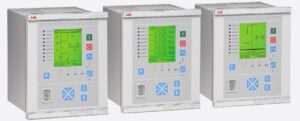
Using an ABB REF543 relay as a case study, you will gain practical knowledge that can be applied to other ABB RE 500 series relays, including REM543, REM545, REF541, REF543, and similar devices.
Who This Course Is For
- Protection Engineers
- Commissioning Engineers
- Substation Automation Engineers
- Power System Engineers
- Electrical Engineering Students
- Anyone working with ABB RE 500 series relays
What You Will Learn
- Understand the hardware architecture of ABB RE 500 series relays
- Navigate the CAP 505 user interface efficiently
- Create and manage CAP 505 projects
- Build and organize project structures
- Configure logical function blocks
- Configure analog and binary inputs and outputs
- Configure directional overcurrent and directional earth-fault protection
- Configure blocking signals using inrush current and fuse failure logic
- Configure trip signals, LEDs, LCD indications, and measurements
- Configure the disturbance recorder
- Understand key protection settings
- Upload and download configurations to the relay
Course Curriculum
Part 1 – ABB RE 500 Relay Hardware Overview (26 min)
- Hardware architecture of the RE 500 series
- Overview of supported relay models
Part 2 – CAP 505 User Interface (13 min)
- User interface overview
- Create a new project
- Add an ABB REF543 relay
Part 3 – Project Structure (16 min)
- Organize project hierarchy
- Libraries
- Resources
- Tasks
Part 4 – Function Blocks and I/O Configuration (8 min)
- Configure logical function blocks
- Analog inputs
- Binary inputs
- Binary outputs
Part 5 – Blocking Logic (9 min)
- Inrush current blocking
- Fuse failure logic
Part 6 – Trip Configuration (4 min)
- Configure protection trip signals
Part 7 – Measurements and LED Configuration (5 min)
- Configure LEDs
- Configure measurements
Part 8 – Disturbance Recorder (3 min)
- Disturbance recorder configuration
Part 9 – LCD Configuration (8 min)
- Configure LCD indications
- Display breaker status and measurements
Part 10 – Settings and Download (15 min)
- Configure protection settings
- Download settings to the relay
- Upload and manage relay configurations
Instant Access
After completing your purchase, this course will be unlocked immediately and will be available from your Learning Dashboard, allowing you to start learning right away.
This course includes lifetime access to all current lessons and future updates at no additional cost.
CAP 505 Training
https://elec-engg.com/cap-505-training
Pre-recorded Videos by Dr. Saeed Roostaee
- Part 01: RE 500 relay hardware explanation (26 minutes)
- Part 02: CAP 505 user interface, create a project, and add relay REF 54 (13 minutes)
- Part 03: Create project structure (16 minutes)
- Part 04: Function blocks and IO configuration (8 minutes)
- Part 05: Blocking signal by inrush and Fuse failure (9 minutes)
- Part 06: Config Trip signals (4 minutes)
- part 07: Measurements and LEDs configuration (5 minutes)
- Part 08: Disturbance recorder configuration (3 minutes)
- Part 09: LCD configuration (8 minutes)
- Part 10: settings and download to the relay (15 minutes)
Course Contents:
- The hardware structure of ABB RE 500 series (REM543, REF543, REM545, REF 541, REF543, …)
- Introduce the CAP 505 and the user interface (Caption bar, Toolbar, Project Structure, Status bar, Status bar, Menu bar)
- Create a new project and add a case study relay (manage the project, project structurization, add new Rlay REF 543, The configuration dialog for REF54x device, add communication port)
- Create project structure (define the library, add Logical POUs, Physical hardware config, resources, tasks, assign tasks, …)
- Add function block and config Inputs and outputs ( add directional Overcurretn and Direction earthfall functions, Config analog inputs, binary inputs, and binary outputs, …)
- LED, LCD, measurement, and disturbance configuration (Config trip signals to the LEDs, config measurements to the LCD, Config the breaker position to the LCD)
- Settings and upload/download (explain the main parameters of the Directional overcurrent, Direcinal earth fault, disturbance recorder, Fuse fail, inrush current, …)