
#640 Course Code
ABB PCM 600 Training
Video-Based (Pre-recorded)
- Lifetime access to the course and all future updates
- Instructor: Dr. Saeed Roostaee
- Language: English
- Course Created: November 2019
- Last Updated: December 2025
- Total Training Time: 12.5+ Hours
- Supplementary Files (Software, Connectivity Packages, Manuals, PDFs, Videos, Sample Projects, and More)
- Certificate of Completion
- Technical Support
- Join our WhatsApp group for course updates
Master ABB PCM600 and ABB Protection Relays
Develop the skills required to confidently configure, commission, maintain, and troubleshoot ABB protection relays using PCM600.
This comprehensive training package combines prerequisite lessons, hands-on practical demonstrations, real engineering examples, and supplementary reference materials to help you become proficient with ABB relay engineering.
Whether you are new to PCM600 or looking to improve your existing skills, this course provides a structured learning path from the fundamentals to advanced configuration techniques.
What You’ll Learn
- Install and configure PCM600
- Create and organize projects
- Configure ABB protection relays
- Configure hardware and analog inputs
- Build application logic
- Configure protection functions
- Parameter setting and XRIO
- IEC 61850 Engineering
- GOOSE Messaging
- Client-Server Reports
- Signal Matrix
- Graphical Display Editor
- Disturbance Handling
- Firmware Updates
- Online Monitoring
- Relay Testing
- Commissioning Best Practices
Prerequisites
To help you start quickly, this course includes two prerequisite sections containing carefully selected videos and presentations.
Watching these lessons before starting the main training is highly recommended.
Prerequisite A (55 Minutes)
- PCM600 overview
- Software installation
- Communication setup
- Project creation
- Hardware configuration
- Application Configuration
- Graphical Display Editor
- Read/Write Tool
- User Management
- Online Monitoring
- Event Viewer
- Disturbance Handling
- Scheduler
- Signal Matrix Editor
- Parameter Setting
Prerequisite B (80 Minutes)
- Update Manager
- Project creation
- Reading configuration from an IED
- Option Settings
- User Management
- Configuration Migration
- Hardware Comparison
- Writing configuration to an IED
- Signal Matrix
- Application Configuration
- Parameter Setting
- Graphical Display
- Signal Monitoring
- Disturbance Handling
- Scheduler
- IED Compare
- Technical Key
- IEC 61850 GOOSE Configuration
- IEC 61850 Report Configuration
- SCL Version (Edition 1 & Edition 2)
Main Training
The main training is divided into practical engineering sessions.
Part 1
- ABB relay family overview
- PCM600 installation
- Connectivity Package installation
- Creating project structures
- IEC 61850 engineering
- Adding ABB and third-party IEDs
- Relay configuration methods
- Using XRIO files
Part 2
- Hardware configuration
- Current and voltage input configuration
- Application Configuration
- IEC 61850 naming
- ANSI device codes
- Configuring Overcurrent Protection
Part 3
- Distance Protection configuration
- SMAI
- SMBI
- SMBO
- ZMMAPDIS
- ZMMPDIS
- FUFSPVC
- Practical signal configuration
Part 4
- Directional Earth Fault (67N)
- Disturbance Reports
- ARDAR
- BRDAR
- LED configuration
Part 5
- Parameter Settings
- XRIO files
Part 6
- Product Guide
- Ordering ABB relays
- Modifying pre-configured distance relays
- Communication Logic
- Analog Input Configuration
Part 7
- Current Protection
- Voltage Protection
- Earth Fault Protection
- Communication Logic
- Auto-Reclosing
- Tripping Logic
- Signal Logic
- Virtual Binary Inputs & Outputs
- Disturbance Reports
Course Updates
March 2022
Added 106 minutes of practical training covering:
- Online communication with ABB relays
- Working with physical IEDs
- Testing protection functions
August 2023
New lessons include:
- Getting Started with PCM600
- Plant Structure
- Parameter Setting
- Application Configuration
- Graphical Display Editor
- Disturbance Handling
- IEC 61850 Configuration
- Adding Software Packages
- Adding Hardware Modules
- Connecting to ABB Relays
- Firmware Updates
- License Update Tool
- REX640 Engineering
Benefits You’ll Gain
After completing this course, you will be able to:
- Configure ABB protection relays with confidence
- Reduce commissioning time
- Troubleshoot relay configuration issues efficiently
- Understand IEC 61850 engineering within PCM600
- Configure protection functions correctly
- Work confidently with ABB connectivity packages
- Perform firmware updates and relay maintenance
- Improve your engineering and commissioning productivity
Supplementary Files Included
This training package includes valuable engineering resources, including:
- PCM600 software
- Connectivity Packages
- Manuals
- Product Guides
- Sample Projects
- PDFs
- Reference Videos
- Engineering Documents
Continuous Course Updates
This course is continuously updated with new lessons, practical examples, and the latest ABB software features. Once enrolled, you’ll receive all future updates at no additional cost.
Enroll Today
Take your ABB relay engineering skills to the next level with this practical, hands-on PCM600 training package.
Click Add to Cart to begin learning today.
If you have any questions before enrolling, feel free to contact us.
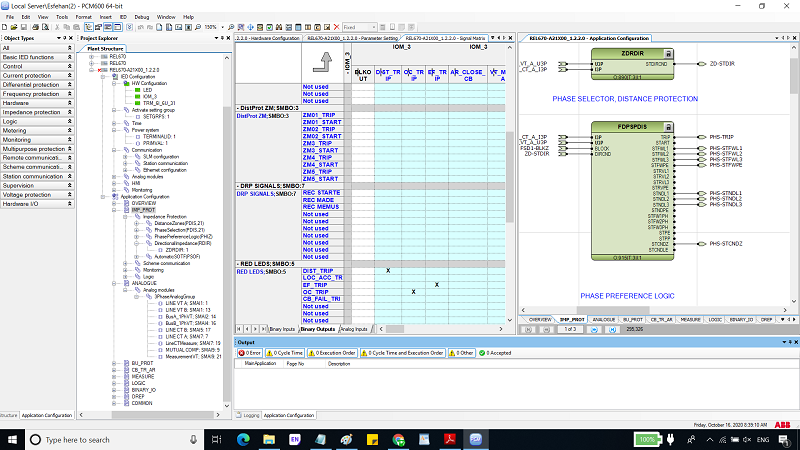
ABB PCM 600 training – Distance relay configuration
Prerequisite A: (55 min)
- Pre-A01 (duration 7:24): An overview of the PCM 600 functionality as well as how to get the software
- Pre-A02 (duration 10:54): Communication and Project setup, establish communication between the physical IED and PCM 600, Manage project with PCM 600, Hardware configuration
- Pre-A03 (duration 12:55): How to use the Application configuration tool in the PCM 600
- Pre-A04 (duration 3:23): How to use the Graphical Display editor tool in the PCM 600
- Pre-A05 (duration 2:00): How to use the Read and write the tool in the PCM 600
- Pre-A06 (duration 4:38): How to use the user management in the IED and PCM 600
- Pre-A07 (duration 6:41): IED online monitoring, event viewer, signal monitoring, disturbance handling, and scheduler in the PCM 600
- Pre-A08 (duration 2:34): How to use the signal matrix editor tool in the PCM 600
- Pre-A09 (duration 4:27): Parameter setting tool in the PCM 600
Prerequisite B: (80 min) (sample at the end of this page)
- Pre-B01: Opening the update manager and installing the updates available
- Pre-B02: Opening PCM 600, create a project, and read all from the IED
- Pre-B03: PCM 600 option settings
- Pre-B04: PCM 600 user management settings
- Pre-B05: Migrate configuration
- Pre-B06: Compare hardware configuration
- Pre-B07: Writing configuration into IED
- Pre-B08: Interlocking between application configuration and signals matrix tool in PCM600
- Pre-B09: Signal matrix
- Pre-B10: Parameter setting
- Pre-B11: Graphical Display
- Pre-B12: Signal monitoring
- Pre-B13: Disturbance handling
- Pre-B14: Scheduler in PCM 600
- Pre-B15: IED compare
- Pre-B16: Technical key in ABB relay IED
- Pre-B17: IEC 61850 GOOSE configuration in PCM 600
- Pre-B18: IEC 61850 Report configuration in PCM 600 (Client-Server)
- Pre-B19: SCL version in the IEC 61850 Ed1 and IEC 61850 Ed2 of an ABB IED relay
Main Training ABB PCM 600 training by Dr. Saeed Roostaee (4 hours in English)
- Part 1: ABB relays history, PCM and connectivity pack installation, create project structure based on IEC 61850, different ways to add IEDs (ABB and non-abb relays), different steps to config a relay without reconfiguration and with reconfiguration, how to use Xrio format to set the parameters
- Part 2: hardware configuration, config analog inputs (voltage and current), application configuration, function blocks and naming based on IEC 61850 standard, IEC symbol, and ANSI code, config a simple overcurrent function,
- Part 3: config a simple distance protection function (SMAI, SMBI, SMBO, ZMMAPDIS, ZMMPDIS, FUFSPVC, …), configure sample signals based on the 7SA diagram (diagram is discussed and configured in the DIGSI 5 training pack)
- Part 4: config a simple 67N protection function, config disturbance reports (ARDAR, BRDAR, LED)
- Part 5: Parameter settings, XRIO format
- Part 6: product guide for a pre-configured distance relay, and ordering, modify pre-configured distance relay based on our projects, Analog inputs (current &s for voltage), Distance Protection functions, and Communication logic
- Part 7: Current and Voltage protection functions and Earth Fault Protection Communication logic, Circuit Breaker Autorecloser and Tripping logics, Signal Logic and General IED functions, Virtual Binary inputs and outputs, Disturbance report analog and binary inputs